CLEAR-COM TMR42509INCC-A Tempest Channel Wireless Beltpack TMP-209 900 Transceiver
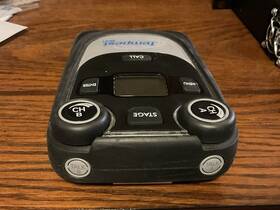
( Brand: Clear-com ), ( Manufacturer Part Number: TMR42509INCC-A ), ( Model: TMP-209 ), ( Form Factor: Transceiver ), ( Type: Beltpack ), ( Color: Clear ), ( Connectivity: Wireless )
Review CLEAR COM Tempest 900 Channel Wireless Beltpack Transceiver
The ClearCom Tempest 900 TMR42509INCC-A Tempest 209 Channel Wireless Beltpack Transceiver is a cutting-edge wireless communication device designed for professional use in high-noise environments. This beltpack transceiver is part of ClearCom's Tempest 900 series, known for its robustness, reliability, and superior sound quality.
The TMR42509INCC-A is a two-wire beltpack transceiver, offering 209 frequency channels to ensure seamless and interference-free communication. It operates on the 1.9 GHz band, providing a wide coverage area and excellent range. The unit is lightweight and ergonomically designed, making it comfortable to wear for extended periods, even in active situations.
The Tempest 209 Channel Wireless Beltpack Transceiver features ClearCom's proprietary Tempest technology, which offers superior RF performance, advanced encryption, and exceptional audio quality. The device is equipped with a high-sensitivity, low-noise receiver and a wideband, high-fidelity audio codec, ensuring clear, crisp, and intelligible audio.
The TMR42509INCC-A also offers advanced features such as automatic frequency coordination, dynamic frequency selection, and roaming. It is compatible with a wide range of ClearCom wireless intercom systems, making it a versatile and flexible solution for various communication needs.
In conclusion, the ClearCom Tempest 900 TMR42509INCC-A Tempest 209 Channel Wireless Beltpack Transceiver is a high-performance wireless communication device ideal for professional applications in challenging environments. Its robust design, superior sound quality, and advanced features make it a reliable and indispensable tool for any professional communication setup.
Pros of buying Clear-Com Tempest 900 TMR-42509INCC-A Channel Wireless Beltpack Transceiver:1. Advanced wireless technology: The Tempest 900 operates in the 900 MHz band, providing reliable communication with minimal interference.
2. High-quality audio: It features a digital audio codec that delivers superior sound quality, even in noisy environments.
3. Robust build: The beltpack is designed to withstand tough conditions, making it suitable for outdoor use or in harsh environments.
4. Versatile: The Tempest 900 supports up to 209 wireless beltpacks, allowing for large-scale communication systems.
5. Easy to use: The beltpack has an intuitive interface, making it simple to use even for those without extensive technical knowledge.
Cons of buying Clear-Com Tempest 900 TMR-42509INCC-A Channel Wireless Beltpack Transceiver:1. Expensive: Compared to other wireless communication systems, the Tempest 900 is relatively costly, which may be a deterrent for some buyers.
2. Limited range: While reliable, the Tempest 900 has a limited range compared to some other wireless communication systems, which may not be suitable for large-scale applications.
3. Requires licensing: Operating in the 900 MHz band requires a license, which may add to the overall cost and complexity of the system.
Conclusion:The Clear-Com Tempest 900 TMR-42509INCC-A Channel Wireless Beltpack Transceiver is a high-quality, reliable wireless communication system that delivers superior sound quality and robust performance. However, it is also expensive and has a limited range, which may be a drawback for some buyers. Ultimately, the decision to purchase the Tempest 900 should be based on the specific needs and requirements of the user.
Recommendation:If you require a reliable, high-quality wireless communication system for a large-scale application, the Clear-Com Tempest 900 TMR-42509INCC-A Channel Wireless Beltpack Transceiver is a strong contender. However, if cost is a factor or if a longer range is required, you may want to explore other wireless communication systems that may better meet your needs.
Details:
Pressing the Stage Announce button automatically enables microphone, regardless of Talk Button status. The Leds will flash blue to indicate which intercom channel, A or. Please be careful to insert alkaline AA batteries according the marked. To remove the battery door, press down on thumb markings and pull door toward bottom of.
Base Station, RF strength, battery level, and other data. The Volume Press. Each Talk button has two individual LED indicators. This Headset connector allows a user to Communicate in Dual-listen or Single-listen mode on either intercom channel.
See the section on GPO Relays. NOTE: NO Battery packs. Pressing the MENU button while at Main Menu screen will exit Mode and return. 3 MENU Button.
The USB Connector is used to charge the Belt Station with supplied wall charger. In Menu Mode, pressing the ENTER. Once in Menu Mode, pressing MENU again will act as an escape key and back out of the current menu screen. The longer wave lengths and wider symbol width used in the 902 to 928 MHz frequency range allow Tempest900 signals break through dense walls other structural objects more readily, increasing for users reducing potential loss of audio.
For four seconds to turn the Belt Station OFF. Any connected wired intercom system. Keep this cover securely closed at all times. This feature can be enabled.
ENTER button or Volume control is pressed. Together they surround. The Stage Announce STAGE button re-routes the microphone signal of Belt Station from selected intercom channel. While in Operational Mode, the LCD displays status of Belt Station including name currently Communicating.
Belt Station Overview. Talk Button A and B. Requires a press and turn to adjust the volume level.
If desired, when this button is pressed, a momentary. May not be inserted correctly. Relay contact closure is made at the connector. Option which requires the knob to be pressed and held slightly longer in.
If the battery cover does not fit or close properly. The Channel Indicator Leds will flash red when the microphone signal is reaching. All of the alkaline AA cells face same direction. Button selects the current menu option and is same as pressing a Volume control.
If you are using electorate mics should open the Ci recruit. A menu item is not selected until. To the Base Station rear panel Stage Announce SA output connector. A peak level and is entering into limiting.
Channel A and the other for channel B. In Operational Mode, turning the Volume control adjusts volume of. In Menu Mode, turning either Volume control allows the user to scroll. Tempest uses an intelligent latching method for TALK.
This will keep the belt from switching back and forth between modes. Enabled, users will here a tone each time the TALK button. Uses three AA batteries. To Operational mode.
Moving the user up one level. The Belt Clip enables the Belt Station to be worn on users belt or other clothing. The Volume control has a channel Delay Switch. Adjustments menu screen under the LCD/LED section of Belt Station.
To ensure the best possible seal. Pressing the TALK button momentarily will cause. Single-listen mode, pressing CH A enables channel. Hold the Power ON/OFF button for two seconds to turn Belt Station ON.
The ENTER button is also one of the buttons that can be assigned to activate a Relay in Base Station. Under the Set Controls section of Belt Station menu. 2 Stage Button. The Power ON/OFF button is used to turn the Belt Station ON or OFF.
It is possible. Talk tones can be enabled or disabled per Belt Station. The intercom channel. Pressing and holding the TALK.
Enables the microphone signal for assigned intercom. Pressing the Volume control selects. Volume indicators appear on the display during adjustment. Option can be adjusted under the Set Controls section of Belt Station.
If you are using dynamic mics, should short the input to ground. Channel Indicator Leds A and B. B enables channel. B, has been selected and will illuminate continuously to indicate that Talk is.
Pressing the Volume control in Dual-listen mode does nothing. There are two TALK buttons on each Belt Station, one for. To remove batteries from the battery Compartment turn Belt Station side down and tap bottom. The LCD back light and contrast can be adjusted from.
The ENTER button operates differently depending on the mode of Belt Station. The menu can be locked via a Menu Lock feature per Belt Station. Activate the Relay whenever Wireless ISO feature is used. The Belt Station Pairing Connector is used to pair the with Base Stations using.
The USB connect is used to update the firmware of Belt Station. The Stage emu. Through the USB or Belt Station pairing connector. It will indicate an.
Enabled on that channel. The Volume control has an option to be set Press where it. The TALK button to latch. Options of the current menu screen.
The Rubberized Access Cover helps prevent dust, dirt and liquid from entering the Belt Station. And are expressed in Decibels dB. Order to switch from one channel the other. Button will cause the button to act as a momentary switch.
1- Volume CH A and B.
part #: tmr42509incc prices
- $110.00-$349.85
specifications micwisys:
- brand: Clear-com
- mpn: Tmr42509incc-a
- model: Tmp-209
- form factor: Transceiver
- type: Beltpack
- color: Clear
- connectivity: Wireless
shipping micwisys:
- cost: $11.00
- type: Fixed
- service: USPS Priority Mail
- carrier: USPS
- class: Expedited
- transit: 6-11 Days
payments micwisys:
- wallet: Paypal
- credit card: Visa
- other
seller micwisys:
- rating: 100.0%
- # reviews: 215
- city: Baton Rouge, Louisiana
offer micwisys:
- availability: In Stock
- started: October 18, 2024
- options: Ship-to-home
- sold: 0
returns micwisys:
- policy: No Returns
general micwisys:
- Musical Instruments Gear > Pro Audio Equipment > Microphones Wireless Systems
- condition: Used
Clear-com TMR42509INCC Is Similar To:
- Ac-10h Adapt-a-com Clear Com (21.3% similar) Clear AC-10H adapt-a-com included items the listed in and shown photos...(August 8th, 2018)
- Rs-501 Clear Com 6 Beltpack Communication Single Channel W 7 Headset And Cs-21 (30.2% similar) Plus seven headset or headphone. Vintage clear intercom all in used condition. Each intercom has its own box. There are six rs 501 beltpack communication intercoms with single channel. Came from a small local audio business...(August 21st, 2016)
- Wtr-680-b4 N A Clear-com 2 Ch Wireless Uhf Transceiver Band B4 (52.6% similar) Shipping costs based on weight tbs after offer. Clients include the film studios, independent cinema production, TV studios and discerning corporate clients across five continents, and counting quotes and references available immediately, on request. Film in film out and everything in between that's...(September 27th, 2016)
- Rw800 Hme Clear Com Rack Uhf (23% similar) Includes power supply and antennas. Working unit with 4 belt packs...(December 30th, 2016)
- Datarm 795847265940 Wireless Lavalier Microphone For Iphone Ipad Clear Sound Cordless Mini Micr (22% similar) Ideal for various applications such as blogs, interviews, live streaming on YouTube, ticktock, podcasting, and live performances. Only compatible IOS devices wireless lavaliere microphone for iPhone or iPad not working with USB type-c port. Just get the receiver into your devices and it pairs ...(December 29th, 2023)
- Clear-com Bp210 Clear-com Communication Beltpack With 2 Hme Bat41 Batteries 1731-39 (44.1% similar) 100% satisfaction guaranteed. The BP210 is compatible with the DX210 digital wireless system. Condition: used. Your #1 source for new used av equipment. Return shipping: buyer pays return shipping. Clear-com BP210 communication beltpack w/ 2 hem BAT41 batteries 1731-39...(May 3rd, 2024)
- Clear-com Wbs-670 Clear-com Uhf Wireless Intercom Base Station (46.2% similar) Appointment is required for local picking up customer. Any other parts or accessories that are not shown in the pictures included. See pictures for further details. Excellent - minor surface blemishes that can be seen, but not felt. Good - small scratches, minor scuffing. Fair - medium scratches, ...(August 22nd, 2024)
- Movo 817711022814 Wmx-1-tx 2.4ghz Wireless Lavalier Microphone Transmitter Crystal Clear (31.9% similar) Our friendly us-based support team is here to help, video lavaliere mic: improve your audio quality with this wireless lavaliere microphone for iPhone, android smartphones, and SLR videos, includes: WMX-1-TX wireless lav mic transmitter, foam windscreen. Important note - requires receiver unit sold ...(November 17th, 2024)
- Lekato M02062 2 Wireless Rechargeable Microphone Uhf Metal Dynamic Receiver Clear Sound (32% similar) The black microphone will not charge red and receiver work great pals see pics. Happy buying. I do go as green can and will recycle packaging material to cut down on waste...(November 26th, 2024)
- Clear-com Wbs-680 Clear-com With 2 Wtr-680 Ants Bttry Pcks Antns 1 Pwrcrd used (43.9% similar) Product guide and other accessories not included. Not thoroughly tested. Sold as pictured. All units are sold without manufacture warranty information. Scuffs-scratches-digs-markings-debris, powers on. Includes only parts displayed in pictures. Refer to pictures provided. Includes: 1 Clear-com WBS-...(December 19th, 2024)
- Clear-com Tmr22509incc Clear-com Tempest 900 Cp-922 Wireless Beltpack Transceiver (89.1% similar) Free shipping. Comes with device only as shown. Clear-com tempest 900 CP-922 wireless beltpack transceiver TMR22509INCC. Great condition as the pictures show. Tested and working...(February 4th, 2025)
